

Before you begin
An imported or authored screenplay and a reviewed Production Lookbook.
What you’ll do
The Cast Members, Locations, and important Props needed for your first scene, with reviewed design notes and references.
Develop the cast and world
Movie Director routes character work to Casting Director and Location and Prop work to Production Designer. These skills read the screenplay, existing project facts, and active supporting material before creating or updating the subjects. Your import settings may already have started this work.
- Review the existing Cast, Locations, and Props in Studio. If they still need development, ask for the whole screenplay or limit the request to your chosen scene.
- Let the skills perform the breakdown. They ask about meaningful ambiguities, such as whether two character names identify the same person or whether a mentioned object should become a Prop.
- Review the resulting descriptions and add creative direction or corrections. Importing another source file alone does not refresh these descriptions; ask for an update when you want its information incorporated.
Develop the cast, locations, and props needed for the current scene.
Shape the characters and spaces
Casting Director develops Cast Design, including appearance, performance, costume continuity, and voice direction. Production Designer develops Location and Prop Design. Each skill uses the relevant project context; Media Producer takes over when you request images or generated audio.
- Ask to develop a character, Location, or Prop. Add any choices you already know, such as “He should look worn down by years of travel” or “The room should feel imposing but neglected.”
- Review the written design in Studio, then request the visual you need: a character sheet, profile, Location Sheet, Location Hero, Prop Sheet, or Prop Hero.
- For voice work, ask Casting Director to help define the voice and attach a chosen sample. Generated voice samples go through Media Producer. Review the actual audio before choosing a performance.
Develop this character’s design and generate a character sheet. Make him weathered and practical rather than heroic.
Choose how much casting you want to direct
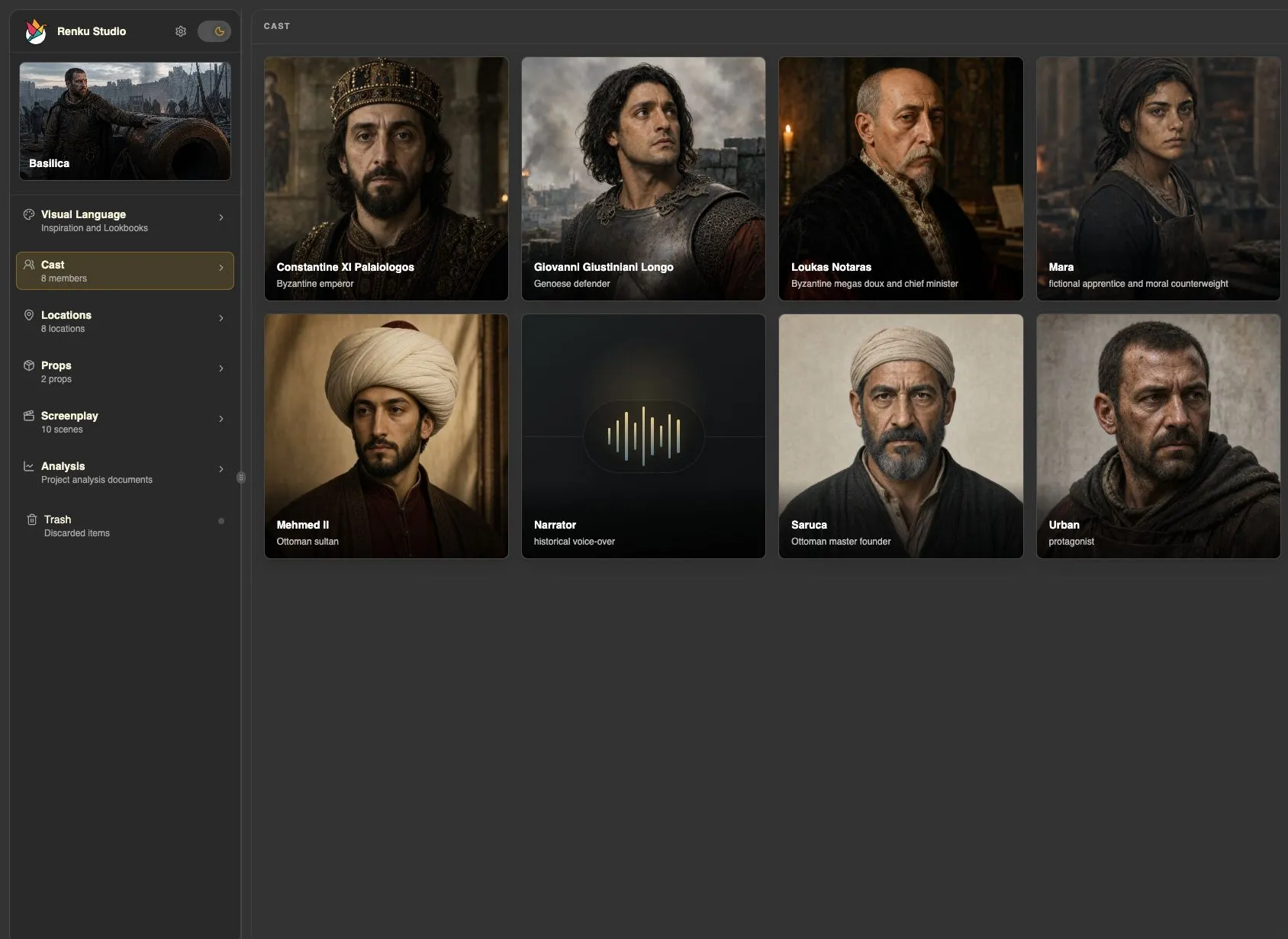
For a quick pass, ask the agent to develop the character and make one option, as in the Basilica and Sintel projects. When you want to explore, ask for a casting round: generate several candidates, compare them, cast a Look, then generate and pick character sheets per costume. Casting Director organizes the choices; Media Producer makes the images.
- Use one Cast Member for one person. Different ages or major changes in build become Looks with their own scenes; changes of clothing become costumes within a Look.
- Review candidates and character sheets in the Cast Member’s Casting tab. In supported Codex Desktop sessions, the Renku plugin also provides inline planning panels and casting boards.
- Choose the quick approach when you want the agent to carry more of the work, or follow the detailed guide when you want to audition alternatives yourself.
Help me cast this character. I want to compare several options before choosing a face and making character sheets.
Find each character’s voice
Casting Director develops voice direction and attaches Cast Voices. Media Producer generates voice samples or retrieves a selected provider voice’s sample. These samples establish a character’s voice identity so later dialogue can stay consistent.
- Ask for a voice sample for your character, adding any direction you have about accent, timbre, or delivery. You can name a provider and model; otherwise, the workflow starts from Project Settings.
- Listen to the sample in the character’s Assets tab, then compare it with the other characters. Ask for another option if the voice or contrast is wrong. Use Set as default voice sample on the voice you want to carry forward.
- Dialogue generation starts from each speaker’s default Cast Voice. The chosen model must support that voice reference: ElevenLabs requires a compatible ElevenLabs voice identity; Seed Audio uses audio samples. The agent checks compatibility and can help choose another voice for one request without changing the default.
Generate a voice sample for this character. Give him a low, measured voice with a restrained delivery.
Refine your references
Media Producer handles image generation and edits, while Casting Director and Production Designer maintain the character and world designs. Your feedback tells the agent what should change and what should remain consistent.
- Review the generated character, Location, or Prop image in Studio. Identify the image you want to work on and describe the change.
- Ask for a focused edit when you want to preserve most of an image. If your direction changes the character or space itself, ask to update its design too.
- For a 3D Location World, Location World Producer prepares four views of the same space from a reviewed Production Location Sheet, presents the inputs, and requests confirmation before the paid World Labs generation. This is an optional workflow.
Keep this location’s layout and architecture, but make the surfaces more weathered and the light softer.
Before moving on
Your first scene has the people, places, and objects it needs, with useful descriptions and deliberately selected visual references. You do not need to finish the entire film’s asset library before continuing.